Rolling an office chair across carpet feels like pushing a shopping cart through sand. On hardwood, every push sends the chair careening unpredictably. A proper chair mat solves both problems, but walk into any office supply store and the options multiply fast, thick versus thin, clear versus tinted, rectangular versus custom shapes. This guide cuts through the confusion, covering the material science, installation mechanics, and long-term maintenance that separate a $30 impulse buy from a decade of smooth rolling. Whether setting up a dedicated workspace or upgrading a makeshift desk corner, the right mat protects flooring, reduces leg fatigue, and keeps focus on work instead of wrestling with furniture.
Table of Contents
ToggleKey Takeaways
- A quality chair mat for office use prevents permanent damage to flooring by distributing concentrated pressure (200+ pounds per square inch) that casters exert, reducing replacement costs that can exceed $500 compared to mat prices of $60–$150.
- Polycarbonate mats offer the best balance for most home offices, lasting 5–10 years with superior durability and temperature resistance, while PVC suits renters and glass mats enhance contemporary design aesthetics despite higher costs and installation challenges.
- Proper chair mat sizing requires measuring your full chair movement range and adding 12–18 inches beyond the farthest roll point, with considerations for carpet pile depth (determine cleat compatibility) and desk height to avoid drawer clearance issues.
- Weekly vacuuming, monthly caster inspections, and six-month mat rotation significantly extend your chair mat’s lifespan by preventing abrasive buildup and distributing wear evenly across the material.
- Installation differs by floor type: hard floors require smooth-sided mats with static friction grip and clean floors before placement, while carpet mats need cleat-side down with firm pressing to properly anchor into pile.
Why Every Home Office Needs a Quality Chair Mat
Chair casters exert concentrated pressure, often 200+ pounds per square inch on standard office chairs, directly onto flooring. Without a mat, carpet fibers crush permanently, creating divots that never spring back. Hardwood and laminate fare worse: wheels grind grit into finish coats, leaving scratches that require professional refinishing to remove.
A chair mat distributes weight across a broader surface, preventing damage before it starts. Rolling resistance drops by roughly 40% on a smooth mat compared to bare carpet, which translates to less strain on legs and lower back during a full workday. Casters glide freely, letting users pivot, reach, and move without constant repositioning.
Flooring replacement costs dwarf mat prices. Refinishing hardwood runs $3–$5 per square foot in most markets: replacing damaged carpet in a single room often exceeds $500. A midrange polycarbonate mat typically costs $60–$120 and lasts five to ten years with proper care. The math tilts heavily toward prevention.
Dust and debris lodge in carpet pile, forcing vacuum motors to work harder. A mat creates a cleanable hard surface, reducing particulate buildup and improving air quality in smaller home offices. For anyone spending more than 20 hours per week at a desk, these compound benefits justify the investment.
Types of Office Chair Mats: Finding Your Perfect Match
Hard Floor vs. Carpet Chair Mats
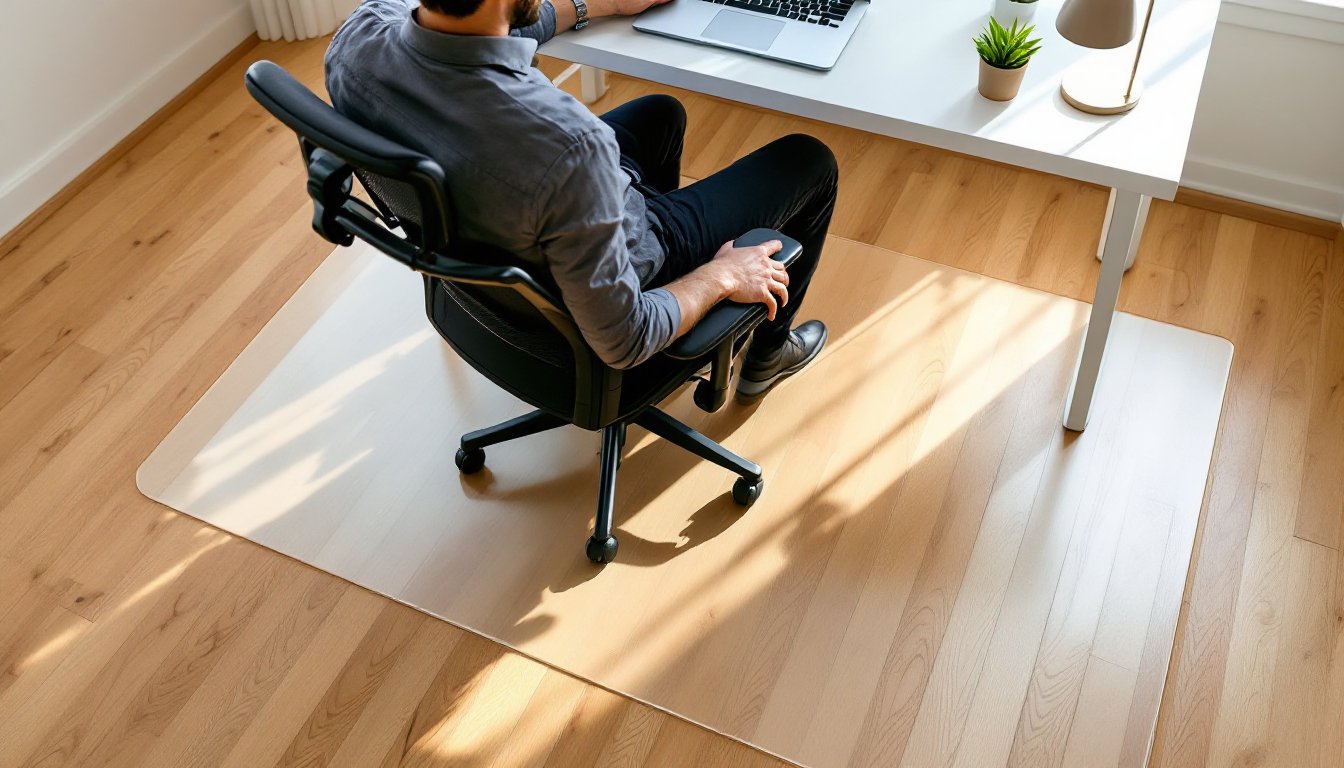
Mats designed for hard floors feature a smooth bottom that grips via static friction, preventing slide without adhesive. These typically measure 1/8 inch thick and work on hardwood, laminate, tile, or vinyl. The smooth underside avoids trapping grit that could scratch finished surfaces.
Carpet mats include cleats or grippers on the underside, small spikes that anchor into pile without damaging fibers. Thickness matters here: low-pile carpet (under 1/2 inch) needs mats around 1/8 to 1/4 inch thick, while plush or high-pile carpet (over 1/2 inch) requires mats at least 3/8 inch thick to prevent sagging. Using a hard-floor mat on carpet invites constant shifting: the wrong thickness lets the mat sink and buckle.
Measure carpet pile depth with a ruler pressed to the backing. Pile height determines cleat length, too short and the mat slides, too long and cleats bottom out without gripping. Some manufacturers label mats for “medium pile” or “thick pile,” but verifying actual dimensions prevents mismatches. Understanding castor compatibility with carpet types helps inform the best mat choice for specific furniture.
Material Options: PVC, Polycarbonate, and Glass
PVC (polyvinyl chloride) mats dominate the budget segment, typically $20–$50 for standard sizes. They’re lightweight, cut easily with a utility knife, and handle moderate use. The downside: PVC yellows under UV exposure, cracks in cold environments, and often contains phthalates that off-gas odors for weeks after unpacking. Some jurisdictions restrict PVC in residential products due to environmental and health concerns.
Polycarbonate mats cost more, $60–$150, but deliver superior impact resistance and clarity. Polycarbonate maintains flexibility across temperature extremes, resists yellowing, and supports heavier chairs without cracking. Thickness ranges from 1/8 to 1/4 inch, with thicker versions handling chairs rated above 250 pounds. Polycarbonate cuts cleanly with a fine-tooth saw if trimming is needed.
Tempered glass mats sit at the premium end, $150–$300, offering the smoothest roll and zero discoloration. Glass withstands heat, resists scratches from metal casters, and integrates into contemporary home office design schemes without visual bulk. Trade-offs include weight (20–30 pounds for a standard mat), installation difficulty on stairs, and catastrophic failure if struck hard enough to shatter. Tempered glass breaks into small, blunt chunks rather than jagged shards, but cleanup remains a hassle.
For most home offices, polycarbonate strikes the best balance of durability, cost, and ease of handling. PVC works for renters or temporary setups: glass suits design-focused spaces where aesthetics justify the expense.
Key Features to Consider Before You Buy
Size and shape directly impact usability. Rectangular mats typically measure 36 x 48 inches (small desk), 45 x 53 inches (standard desk), or 48 x 60 inches (L-shaped desk). Measure the desk footprint first, then add 12–18 inches beyond the chair’s farthest roll point in all directions. Undersized mats force wheels off the edge mid-task, defeating the purpose.
Some mats include a lip extension, a narrower section that slides under the desk to protect flooring beneath the user’s feet. Lip dimensions vary from 10 x 20 inches to 20 x 48 inches. If the desk sits against a wall, a lip isn’t essential: for freestanding desks or frequent foot shuffling, the lip prevents scuffs.
Thickness trades durability for floor clearance. Thicker mats (1/4 inch+) resist wear and support heavier loads but can block low-clearance desk drawers or create a trip hazard. Check vertical space between the floor and the lowest drawer glide before committing. Beveled edges reduce trip risk but don’t eliminate it on thick mats.
Cleat length on carpet mats must match pile depth. Too-short cleats let the mat wander: too-long cleats compress pile excessively, defeating the weight-distribution benefit. Manufacturers usually specify compatible pile ranges, verify these against actual measurements.
Weight capacity matters for executive chairs with gas lifts and adjustable arms. Standard mats handle 250–300 pounds combined (user plus chair). Heavy-duty models support 400+ pounds, necessary for bariatric chairs or standing-desk converters that rest partially on the mat.
UV resistance and warranty length indicate material quality. Polycarbonate and glass mats should include UV inhibitors to prevent yellowing. Warranties range from one year (budget PVC) to ten years (premium polycarbonate). Any mat without at least a two-year warranty likely uses substandard resins.
How to Measure and Install Your Chair Mat Properly
Start by mapping the full range of chair movement. Sit at the desk, then roll to reach the farthest corners of the workspace, printer stand, file drawer, side table. Mark these points on the floor with painter’s tape, then measure the resulting boundary. Add 12 inches minimum to each dimension: undershooting by even six inches creates a mat that feels cramped.
For L-shaped desks, rectangular mats often leave gaps. Some manufacturers offer T-shaped or custom-cut mats. Alternatively, position a standard rectangular mat to cover the primary work zone (keyboard and monitor area), accepting that the secondary desk leg won’t have full protection. Small space offices often require creative mat placement to balance coverage and floor plan flow.
Installation on hard floors: Unroll the mat and let it acclimate at room temperature for 24 hours if it arrives curled. Wipe the floor clean, any grit trapped under the mat will grind into both surfaces. Center the mat, ensure the smooth side contacts the floor, and check that edges lie flat. If corners curl, apply gentle heat with a hairdryer (12 inches away, medium setting) to relax the material.
Installation on carpet: Flip the mat cleat-side down. Press firmly along all edges to seat the cleats into pile. Walk the perimeter to verify grip, the mat shouldn’t slide when pushed laterally with moderate force. If it shifts, the cleats are too short for the pile depth: return it and size up.
Trimming requires different tools per material. PVC: score repeatedly with a sharp utility knife along a straightedge, then snap along the score line. Polycarbonate: use a fine-tooth handsaw or jigsaw with a plastic-cutting blade: clamp the mat to a workbench and cut slowly to prevent chipping. Glass: cannot be cut safely at home, order exact dimensions from the manufacturer.
Safety note: Wear safety glasses when cutting any mat material. Polycarbonate chips can fly: PVC dust irritates eyes.
Maintenance Tips to Extend Your Chair Mat’s Lifespan
Weekly cleaning prevents abrasive buildup that accelerates wear. Vacuum the mat with a hard-floor attachment to remove dust and debris. For deeper cleaning, wipe with a damp microfiber cloth and a drop of pH-neutral dish soap. Avoid ammonia-based cleaners, they cloud polycarbonate and weaken PVC over time.
Inspect casters monthly. Worn or damaged wheels deposit rubber residue and metal particles onto the mat. Replace casters showing flat spots, cracks, or missing tread. Polyurethane casters (typically tan or gray) cause less mat wear than hard plastic or metal wheels.
Rotate the mat every six months to distribute wear evenly. The area directly under the chair seat experiences the most stress: rotating 180 degrees spreads impact across fresh material. This works best with symmetrical rectangular mats: L-shaped or lipped mats may not allow rotation.
Sun exposure degrades even UV-resistant materials over time. If the desk sits near a window, close blinds during peak daylight hours or reposition the mat slightly every few months. Yellowing and brittleness usually start along edges that receive direct sun.
Address cracks immediately. Small stress cracks in PVC or polycarbonate propagate quickly under load. If a crack appears, stop using that section of the mat, move the chair’s roll zone away from the damaged area. Cracks wider than 1/4 inch compromise structural integrity: replace the mat rather than risk sudden failure.
Prevent curling by maintaining consistent room temperature. Polycarbonate and PVC both soften above 90°F and become brittle below 50°F. If the mat curls after seasonal temperature swings, lay it flat in a climate-controlled room for 48 hours under light weight (a few books at each corner).
Storage: Roll mats smooth-side out (not folded) to prevent creases. Store vertically in a cool, dry location away from solvents, paints, or gasoline, petroleum products chemically attack most plastics.